Showing posts with label IBM. Show all posts

Wednesday, February 26, 2014

Deploying older JAX-WS applications on WAS 7 or higher (Web Service not recognized)


At my company, we've recently been making a large move from Websphere Application Server(WAS) V6.1 to v8.0.  Some of our web service applications have noticed that if they were exposing JAX-WS service in their app and they simply deployed their app to WAS v8.0, their JAX-WS service was not recognized.  That is there are no errors, but the service is not exposed in anyway.  You can't reach it.

This turns out to be due to the way WAS does the scanning for the JAX-WS annotations.  This article from IBM helps explain it, but I'll give my abbreviated version as well...

Turns out that on WAS 6.1 with the WS Feature pack, WAS would scan your web app for JAX-WS annotations and if a Web Service was found it would expose it properly.  However, as of WAS 7, only Java EE 5 compliant modules are scanned.  That means if you created your app for WAS 6.1, then your web project would have been Java EE 1.4 compatible.  Check out wikipedia for a nice chart of WAS versions and their version support.

Java EE 1.4 means your web module will be version 2.4 where in Java EE 5, your web module would be 2.5.  So, if your web module (war) is not 2.5, then WAS 7 and beyond will not scan it for JAX-WS annotations and therefore your JAX-WS web services will never be exposed.

There are two fixes for this.

1) Upgrade your web module to 2.5 to be Java EE 5 compliant and then WAS 7 and higher will scan it for JAX-WS services.

2) Add a special IBM specific flag in your web applciations META-INF/MANIFEST.MF file like this:
Manifest-Version: 1.0
UseWSFEP61ScanPolicy: true

In the second option, this tell WAS to scan for the JAX-WS annotations even though its an older web module.


If you are using maven you may need to modify your POM file if maven is creating your MANIFEST.MF files.  This stackoverflow post helped us.

Here's what we ended up with:

<build>
<plugins>
<plugin>
<groupId>org.apache.maven.plugins</groupId>
<artifactId>maven-war-plugin</artifactId>
<configuration>
<warSourceDirectory>webapp</warSourceDirectory>
<webXml>webapp/WEB-INF/web.xml</webXml>
<archive>
<manifest>
<addClasspath>true</addClasspath>
</manifest>
<manifestEntries>
        <UseWSFEP61ScanPolicy>true</UseWSFEP61ScanPolicy>
      </manifestEntries>
</archive>
</configuration>
</plugin>
...


With this configuration we were able to have maven build our META-INF/MANIFEST.MF file in the war and add the special flag "UseWSFEP61ScanPolicy"

Hope this helps.


Building JAX-WS application with Maven


I was having issues building a JAX-WS application using Maven(NOTE: I'm using maven 2.0.11), when I generated my JAX-WS code using JAX-WS 2.2.  I saw errors like this:

cannot find symbol
symbol  : method required()
location: @interface javax.xml.bind.annotation.XmlElementRef

or

cannot find symbol
symbol  : constructor Service(java.net.URL,javax.xml.namespace.QName,javax.xml.ws.WebServiceFeature[])
location: class javax.xml.ws.Service

This blog really helped me find my solution.

I'll summarize briefly what the issue was.

Java comes with several specifications APIs packaged into it, like JAX-WS & JAXB. However, the version of these specifications are not always the latest.   That is, newer versions of JAX-WS and JAXB may be released, but are not in the version of Java you may be using to compile with.  Even if the newer version is available on your server runtime, they may not be available in your JDK.  And even if you try to explicitly try to add the newer versions of the JAX-WS and JAXB jars to your maven dependency section, it still will not work.

In order to override the built in versions of the JAX-WS and JAXB, you have to utilize the "endorsed" folder.   Follow this link to learn more about the "endorsed" folder.

In short, adding newer versions of the jars to an endorsed folder in your JDK allow them to override any embedded versions.

So, the big question then is how to do this with maven.  Here's the answer..

You use the maven-dependency-plugin to create the "endorsed" folder and copy the newer version of the jars into it.  Then you update the maven-compiler-plugin to refer to this endorsed folder.

Here's a sample POM.


<build>
<plugins>
<plugin>
<artifactId>maven-compiler-plugin</artifactId>
<version>2.3.2</version>
<configuration>
<source>1.6</source>
<target>1.6</target>
<compilerArguments>
<endorseddirs>${project.build.directory}/endorsed</endorseddirs>
</compilerArguments>
</configuration>
</plugin>
<plugin>
<groupId>org.apache.maven.plugins</groupId>
<artifactId>maven-dependency-plugin</artifactId>
<version>2.1</version>
<executions>
<execution>
<phase>validate</phase>
<goals>
<goal>copy</goal>
</goals>
<configuration>
<outputDirectory>${project.build.directory}/endorsed</outputDirectory>
<silent>true</silent>
<artifactItems>
<artifactItem>
<groupId>javax.xml.bind</groupId>
<artifactId>jaxb-api</artifactId>
<version>2.2</version>
<type>jar</type>
</artifactItem>
<artifactItem>
<groupId>javax.xml.ws</groupId>
<artifactId>jaxws-api</artifactId>
<version>2.2</version>
<type>jar</type>
</artifactItem>
</artifactItems>
</configuration>
</execution>
</executions>
</plugin>
</plugins>
</build>


With these settings we were able to successfully build our JAX-WS 2.2 code with Maven.

Hope this helps!


Tuesday, March 19, 2013

JAX-WS with Eclipse and Apache CXF


I was recently asked to help an app team need to develop their first web service.  Being that our company is trying to move to JAX-WS for all new web service providers, we recommended that they use JAX-WS. Not only is it a good specification based approach to Web Services, but IBM’s Rational Application Developer provides tools to quickly and easily develop JAX-WS web services.  However, I learned this app team currently did not have or plan to use RAD, but they would actually be deploying to Websphere(WAS 6.1) with the Web Services Feature pack in their test and production environments..  So, how do you quickly develop and test a JAX-WS web service with all open source tools and not have to mess with command line tools?... Read on...


First, install Eclipse 3.6 Helios for JEE development and it will come with GUI web service tools you’ll need to do the code generation. If you use an earlier version of Eclipse, you’ll have to update it to install the Web Services tools.  I found it easiest just to download 3.6 than to do the update.  You can install 3.6 in a new folder and keep your older Eclipse version as well if you’d like.


I found that Apache CXF is a very quick and easy web service engine to use for JAX-WS based web services.  Plus it plugs in nicely with the Eclipse web service tools to provide a simple gui to do JAX-WS code generation.  


Since they were going to be deploying to WAS 6.1 with the WS Feature Pack, we needed to make sure our genarated code was compliant with the JAX-WS 2.0 spec (which is what WAS 6.1 supported).

But newer versions of Apache CXF are based on JAX-WS 2.1 and even 2.2.  So, we needed to use 2.0.13 because it was based on JAX-WS 2.0 spec which is what WAS 6.1 with the Feature Pack supports.  Using a higher version of CXF causes the generated code to be JAX-WS 2.1+ compliant which will not deploy to WAS 6.1


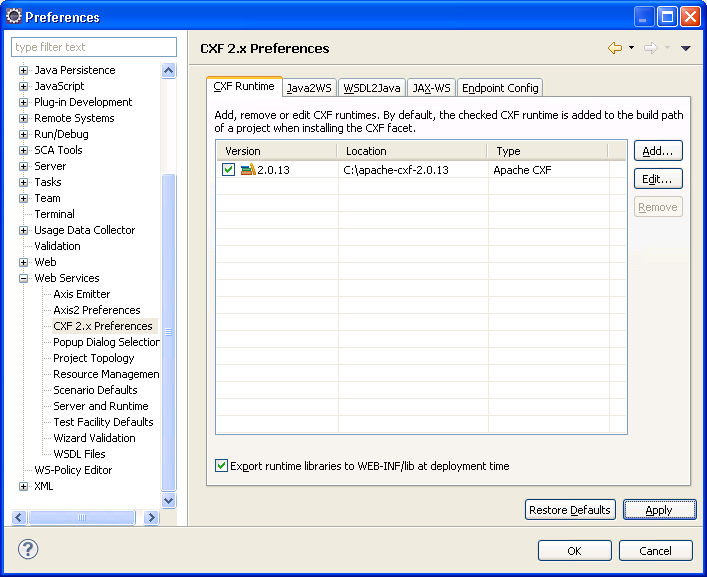
Download Apache CXF and set it’s path in your preferences  http://archive.apache.org/dist/cxf/2.0.13/ :

Be sure the “Export runtime libraries to WEB-INF/lib at deployment time” is checked.  This will make sure the Apache CXF jars are copied into the web project when you deploy the application.  
Download Tomcat 6.X or greater and set it in your preferences:


Now that we should have all the tools we need, let’s start the fun part of developing our service.

In this example, I’m assuming that I’m starting with a WSDL and going to generate the code for my service from that.  The steps we will follow are:

  1. Create a Dynamic Web Project for our generated code.
  2. Copy the WSDL into our web project.
  3. Generate the JAX-WS code from the WSDL.
  4. Deploy our application to Tomcat.
  5. Test with SOAP UI.

I’ve got a simple WSDL that is a spell checking web service.  It allows you to pass in some text and then in the response it will identify any misspelled words and also give you suggestions for correct spellings.  We won’t code this functionality, but that’s the WSDL and operation we are working with.

So, let’s do it!  

1) Create a Dynamic Web Project and use the CXF Web Services Project v2.5 Configuration.

Edit the source folder locations to match Maven standards (src/main/java)

Update Content directory to match maven standards(webapp instead of WebContent)


Choose the CXF 2.0.13 runtime.


2) Copy wsdl under the WEB-INF folder into a wsdl folder(you’ll have to create the WSDL folder):

3) Right click on the WSDL and choose Web Services->Generate Java Bean Skeleton:

Adjust the Web Services Runtime to be Apache CXF 2.X:
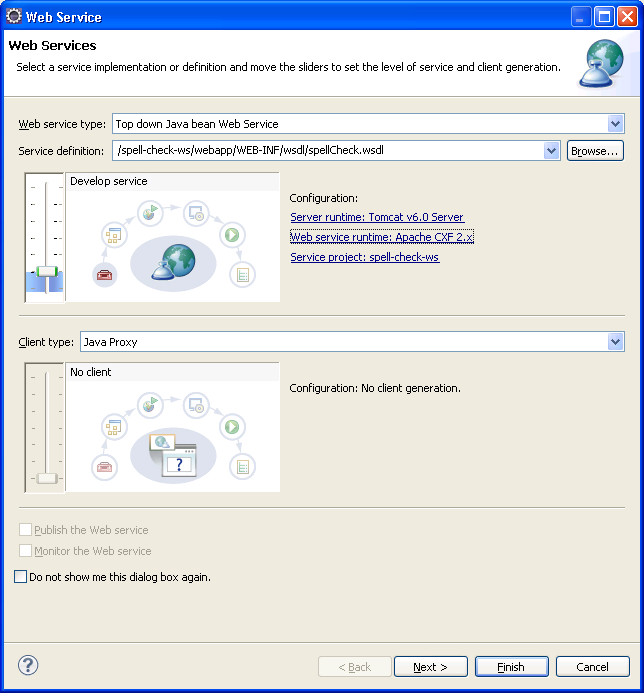
You can adjust the package name if you want: This should be the package name of where the service class will reside, not the request/response objects.

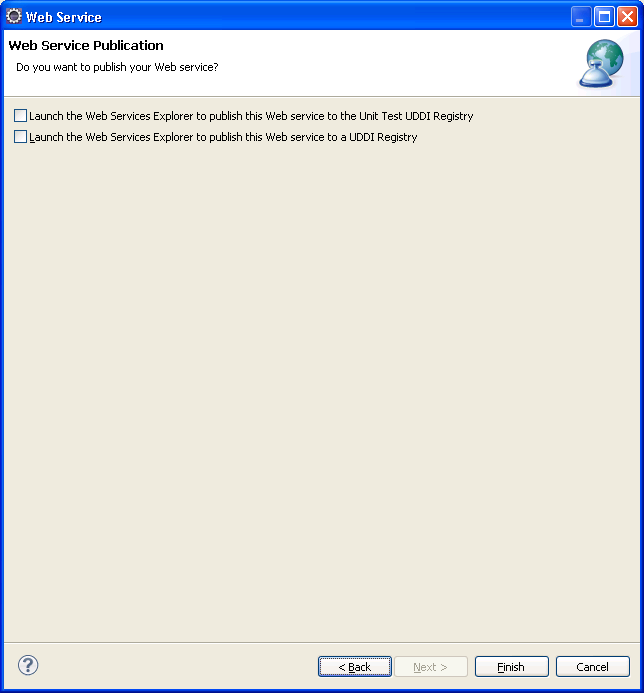
Next window is for the WSDL2Java and XJC binding(request/response) JAX-B bindings. (leave the defaults)


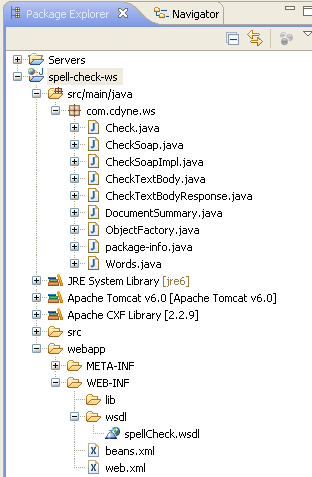
What’s Generated :

This updates the web.xml to define a CXFServlet that will receive the incoming web service request.  Also, the web.xml is updated to configure spring with the beans.xml. (NOTE: that in Websphere there is no need for any special servlet definitions. In WAS, the container scans for the JAX-WS annotations and automatically exposes your services based on the annotations alone.)

<?xml version="1.0" encoding="UTF-8"?>
<web-app xmlns:xsi="http://www.w3.org/2001/XMLSchema-instance" xmlns="http://java.sun.com/xml/ns/javaee" xmlns:web="http://java.sun.com/xml/ns/javaee/web-app_2_5.xsd" xsi:schemaLocation="http://java.sun.com/xml/ns/javaee http://java.sun.com/xml/ns/javaee/web-app_2_5.xsd" id="WebApp_ID" version="2.5">
 <display-name>spell-check-ws</display-name>
 <welcome-file-list>
   <welcome-file>index.html</welcome-file>
   <welcome-file>index.htm</welcome-file>
   <welcome-file>index.jsp</welcome-file>
   <welcome-file>default.html</welcome-file>
   <welcome-file>default.htm</welcome-file>
   <welcome-file>default.jsp</welcome-file>
 </welcome-file-list>
 <servlet>
   <description>Apache CXF Endpoint</description>
   <display-name>cxf</display-name>
   <servlet-name>cxf</servlet-name>
   <servlet-class>org.apache.cxf.transport.servlet.CXFServlet</servlet-class>
   <load-on-startup>1</load-on-startup>
 </servlet>
 <servlet-mapping>
   <servlet-name>cxf</servlet-name>
   <url-pattern>/services/*</url-pattern>
 </servlet-mapping>
 <session-config>
   <session-timeout>60</session-timeout>
 </session-config>
 <context-param>
   <param-name>contextConfigLocation</param-name>
   <param-value>WEB-INF/beans.xml</param-value>
 </context-param>
 <listener>
   <listener-class>org.springframework.web.context.ContextLoaderListener</listener-class>
 </listener>
</web-app>

The beans.xml is autogenerated and is what links the web service to the implemenation class.

<?xml version="1.0" encoding="UTF-8"?>
<beans xmlns="http://www.springframework.org/schema/beans"
xmlns:xsi="http://www.w3.org/2001/XMLSchema-instance" xmlns:jaxws="http://cxf.apache.org/jaxws"
xsi:schemaLocation="http://www.springframework.org/schema/beans http://www.springframework.org/schema/beans/spring-beans-2.5.xsd http://cxf.apache.org/jaxws http://cxf.apache.org/schemas/jaxws.xsd">
<import resource="classpath:META-INF/cxf/cxf.xml" />
<import resource="classpath:META-INF/cxf/cxf-extension-soap.xml" />
<import resource="classpath:META-INF/cxf/cxf-servlet.xml" />
<jaxws:endpoint xmlns:tns="http://ws.cdyne.com/" id="checksoap"
implementor="com.cdyne.ws.CheckSoapImpl" wsdlLocation="WEB-INF/wsdl/spellCheck.wsdl"
endpointName="tns:checkSoap" serviceName="tns:check" address="/checkSoap">
<jaxws:features>
<bean class="org.apache.cxf.feature.LoggingFeature" />
</jaxws:features>
</jaxws:endpoint>
</beans>


It even generates an implementation of the service:

@javax.jws.WebService(
                     serviceName = "check",
                     portName = "checkSoap",
                     targetNamespace = "http://ws.cdyne.com/",
                     wsdlLocation = "http://ws.cdyne.com/SpellChecker/check.asmx?wsdl",
                     endpointInterface = "com.cdyne.ws.CheckSoap")
                     
public class CheckSoapImpl implements CheckSoap {

   private static final Logger LOG = Logger.getLogger(CheckSoapImpl.class.getName());

   /* (non-Javadoc)
    * @see com.cdyne.ws.CheckSoap#checkTextBody(java.lang.String  bodyText ,)java.lang.String  licenseKey )*
    */
   public com.cdyne.ws.DocumentSummary checkTextBody(java.lang.String bodyText,java.lang.String licenseKey) {
       LOG.info("Executing operation checkTextBody");
       System.out.println(bodyText);
       System.out.println(licenseKey);
       try {
           com.cdyne.ws.DocumentSummary _return = new com.cdyne.ws.DocumentSummary();
           java.util.List<com.cdyne.ws.Words> _returnMisspelledWord = new java.util.ArrayList<com.cdyne.ws.Words>();
           com.cdyne.ws.Words _returnMisspelledWordVal1 = new com.cdyne.ws.Words();
           java.util.List<java.lang.String> _returnMisspelledWordVal1Suggestions = new java.util.ArrayList<java.lang.String>();
           _returnMisspelledWordVal1.getSuggestions().addAll(_returnMisspelledWordVal1Suggestions);
           _returnMisspelledWordVal1.setWord("Word-206675031");
           _returnMisspelledWordVal1.setSuggestionCount(969026437);
           _returnMisspelledWord.add(_returnMisspelledWordVal1);
           _return.getMisspelledWord().addAll(_returnMisspelledWord);
           _return.setVer("Ver-644250047");
           _return.setBody("Body-2010852480");
           _return.setMisspelledWordCount(-774292127);
           return _return;
       } catch (Exception ex) {
           ex.printStackTrace();
           throw new RuntimeException(ex);
       }
   }

}

4) Deploying:

Add the project to your Tomcat server:


Then after publishing and restarting the server:
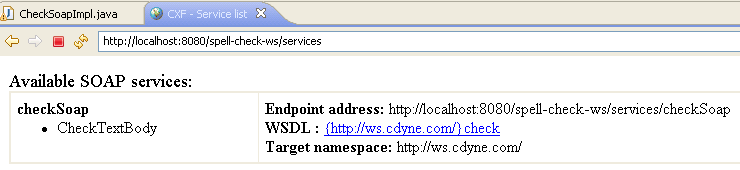


This shows the available services.  If you click on the link after “WSDL:” it will show you the WSDL (NOTE: the text is not the actual link) Clicking on the text takes you to:


Notice the service portion of the WSDL is updated with the endpoint address for your server:
- <wsdl:service name="check">
  <wsdl:documentation xmlns:wsdl="http://schemas.xmlsoap.org/wsdl/">This engine makes spelling suggestions for text.<br><br><b>See it working at</b>: <a href="http://www.cdyne.com/SpellChecker" target="_blank">http://www.cdyne.com/SpellChecker</a></wsdl:documentation>
- <wsdl:port binding="tns:checkSoap" name="checkSoap">
  <soap:address location="http://localhost:8080/spell-check-ws/services/checkSoap" />
  </wsdl:port>
  </wsdl:service>


5) Testing with SOAP UI.

You can use the WSDL location above to create your SOAP UI project.
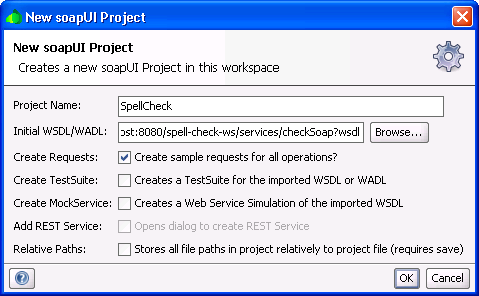


Soap UI will generate a sample request, then you just have to fill in the values.
My sample request:

<soapenv:Envelope xmlns:soapenv="http://schemas.xmlsoap.org/soap/envelope/" xmlns:ws="http://ws.cdyne.com/">
  <soapenv:Header/>
  <soapenv:Body>
     <ws:CheckTextBody>
        <!--Optional:-->
        <ws:BodyText>My poorly speeleed body.</ws:BodyText>
        <!--Optional:-->
        <ws:LicenseKey>key123</ws:LicenseKey>
     </ws:CheckTextBody>
  </soapenv:Body>
</soapenv:Envelope>


And my response:

<soap:Envelope xmlns:soap="http://schemas.xmlsoap.org/soap/envelope/">
  <soap:Body>
     <CheckTextBodyResponse xmlns="http://ws.cdyne.com/">
        <DocumentSummary>
           <MisspelledWord>
              <word>Word-857902635</word>
              <SuggestionCount>-850205234</SuggestionCount>
           </MisspelledWord>
           <ver>Ver-1888918001</ver>
           <body>Body1625834665</body>
           <MisspelledWordCount>-686503157</MisspelledWordCount>
        </DocumentSummary>
     </CheckTextBodyResponse>
  </soap:Body>
</soap:Envelope>


The service worked and I didn’t touch a line of code!!!

The logs show the incoming and outgoing messages:


Hope this helps someone!