Showing posts with label JAXB. Show all posts

Thursday, January 15, 2015

JAX-WS or JAXB working with the any type

Let's say you are working with a Schema that uses an "any" type like in the ws-security schema: (http://docs.oasis-open.org/wss/2004/01/oasis-200401-wss-wssecurity-secext-1.0.xsd):


<xsd:complextype name="SecurityHeaderType">
 <xsd:annotation>
  <xsd:documentation>This complexType defines header block to use for security-relevant data directed at a specific SOAP actor.</xsd:documentation>
 </xsd:annotation>
 <xsd:sequence>
          <xsd:any maxoccurs="unbounded" minoccurs="0" processcontents="lax">
   <xsd:annotation>
    <xsd:documentation>The use of "any" is to allow extensibility and different forms of security data.</xsd:documentation>
   </xsd:annotation>
  </xsd:any>
 </xsd:sequence>
 <xsd:anyattribute namespace="##other" processcontents="lax">
</xsd:anyattribute></xsd:complextype>
You generate the Java code using xjc or wsimport and then are wondering how to use the generated SecurityHeaderType object to put something like a username and password inside of it.

You may try to do something like this:


                // build the security header
  SecurityHeaderType headerWSSE = new SecurityHeaderType();
  
  // Create the userName and password that will go in the security header
  UsernameTokenType userNameToken = new UsernameTokenType();
  AttributedString userNameAttribute = new AttributedString();
  userNameAttribute.setValue("joebob");
  userNameToken.setUsername(userNameAttribute );
  
  PasswordString passwordString = new PasswordString();
  passwordString.setValue("secret");
  userNameToken.getAny().add(passwordString);
  headerWSSE.getAny().add(userNameToken);

(NOTE: UsernameTokenType and PasswordString types are both defined in the ws-security schema found here.)
If you run with this code, you will most likely get an error like this when it attempts to create the XML:

javax.xml.ws.WebServiceException: com.sun.istack.internal.XMLStreamException2: javax.xml.bind.MarshalException
 - with linked exception:
[com.sun.istack.internal.SAXException2: unable to marshal type "org.oasis_open.docs.wss._2004._01.oasis_200401_wss_wssecurity_secext_1_0.UsernameTokenType" as an element because it is missing an @XmlRootElement annotation]

The reason is that when xjc or wsimport generated the JAXB annotated classes it didn't create XmlRootElement annotations for UsernameTokenType or PasswordString.  So, it doesn't know how to handle them properly when they are added to the "any" collection.

So, one fix, is to manually add the XmlRootElement annotations to the UsernameTokenType and PasswordString classes.  However, I generally do not like the idea of manually modifying generated code.  It should be throw away to a certain degree.  That is if the schema changes and I need to re-generate I'd like to be able to just wipe the previously generated code and re-generate the new code.

Another option, is to use a plug-in like the annotate plugin to allow you to create a custom JAXB binding file that will add the XmlRootElement annotation as part of the code generation process.
You can find the annotate plugin here. http://confluence.highsource.org/display/J2B/Annotate+Plugin

The third option you have is to write your code in such a way that it wraps the UsernameTokenType and PasswordString objects in JAXBElement objects that can tell it how to create the root element names.  Here's the code for that:


                // build the security header
  SecurityHeaderType headerWSSE = new SecurityHeaderType();
  
  // Create the userName and password that will go in the security header
  UsernameTokenType userNameToken = new UsernameTokenType();
  AttributedString userNameAttribute = new AttributedString();
  userNameAttribute.setValue("joebob");
  userNameToken.setUsername(userNameAttribute );
  
  PasswordString passwordString = new PasswordString();
  passwordString.setValue("secret");
  
  // Since SecurityHeaderType takes "any" type, we must create JAXBElements to properly set the root elements... stupid "any" type!
  QName qnamePassword = new QName("http://docs.oasis-open.org/wss/2004/01/oasis-200401-wss-wssecurity-secext-1.0.xsd", "Password");
  JAXBElement jaxbPassword = new JAXBElement(qnamePassword ,PasswordString.class,passwordString);
  userNameToken.getAny().add(jaxbPassword);
  
  QName qname = new QName("http://docs.oasis-open.org/wss/2004/01/oasis-200401-wss-wssecurity-secext-1.0.xsd", "UsernameToken");
  JAXBElement jaxbUserName = new JAXBElement(qname ,UsernameTokenType.class,userNameToken);
   
  // Add our JAXBElements to the headers "any" list.
  headerWSSE.getAny().add(jaxbUserName);

This final approach requires you to create a QName instance to set the namespace and the root element name. Then you can create a JAXBElement that wraps your actual PasswordString and UsernameTokenType objects.  In my case, I wanted the PasswordString inside the UsernameToken so that's why you see that I added PasswordString into the usernameToken's any collection.

The code above produces the following XML:


<ns3:Security xmlns:ns3="http://docs.oasis-open.org/wss/2004/01/oasis-200401-wss-wssecurity-secext-1.0.xsd" >
 <ns3:UsernameToken>
  <ns3:Username>joebob</ns3:Username>
  <ns3:Password>secret</ns3:Password>
 </ns3:UsernameToken>
</ns3:Security>

Your namespace pre-fix may vary of course and I removed some of the extra namespace entries that were declared as part of the Security element since they weren't used in this node.

Hope this helps!  If you have any questions, feel free to post them below.

Thursday, September 18, 2014

JAX-WS overriding Parameter name when generating code


When generating JAX-WS from code, you may at times need to override the default parameter names of the generated code.  Actually, sometimes it's required if you are having parameter name conflicts.  That happened to me recently.  I had a wsdl that defined an input message and output message that both had a header part like this:

<wsdl:message name="Ping">
<wsdl:part name="headerWSSE" element="wsse:Security"/>
<wsdl:part name="headerSYS" element="tnv:SystemInfo_Request"/>
<wsdl:part name="ping" element="tnv:ping"/>
</wsdl:message>
<wsdl:message name="PingResponse">
<wsdl:part name="headerSYS" element="tnv:SystemInfo_Response"/>
<wsdl:part name="pingResponse" element="tnv:pingResponse"/>
</wsdl:message>

Notice that both the Ping and PingResponse message define a part with the name="headerSYS".

The issue here is that when the code generator tries to create the ping() method in Java, it tries to create a method with 5 parameters... 3 for the input message parts and 2 for the output message parts. However, it would try to use the part name "headerSYS" as a parameter name for one of the input and one of the ouput parameters and it would bomb out because of two parameters having the same name in the same method signature.

Therefore, one fairly simple solution is to just create a custom binding file that tells ws-import how to handle these parameter names.  Here's what the custom binding file would look like:


<jaxws:bindings wsdlLocation="TelephoneNumberVerification_1_0_Logical.wsdl"
                 xmlns:xs="http://www.w3.org/2001/XMLSchema"
                 xmlns:wsdl="http://schemas.xmlsoap.org/wsdl/"
                 xmlns:jaxws="http://java.sun.com/xml/ns/jaxws"
                 xmlns:jaxb="http://java.sun.com/xml/ns/jaxb"
                 xmlns:tnv="http://barry.com/schemas/customerRelationship/Telephony">
       <jaxws:bindings node="wsdl:definitions/wsdl:portType[@name='TelephoneNumberVerification']/wsdl:operation[@name='ping']">
         <jaxws:parameter
                 part="wsdl:definitions/wsdl:message[@name='PingResponse']/wsdl:part[@name='headerSYS']"
                 childElementName="tnv:SystemInfo_Response" name="headerSysResponse"/>
     </jaxws:bindings>
     
 </jaxws:bindings>


I've attempted to hi-lite any thing that is custom for my wsdl that someone would have to change if they copied it and used it as a template.

By pointing ws-import to this custom binding, I was able to generate the code successfully and ended up with a method signature like this:


  public void ping(SecurityHeaderType headerWSSE, SystemInfoRequest headerSYS, boolean ping, Holder<SystemInfoResponse> headerSysResponse, Holder<Boolean> pingResponse)


Hope this helps!

Friday, August 8, 2014

Dozer Deep Nesting...A different approach. (No Setters, No Problem.)


Have you ever had the issue of trying to do a deep nested mapping using Dozer, but you keep running into issues because the destination object doesn't have a set method for the property you need to populate?

We see this a lot when dealing with generated JAX-WS code.  The JAXB classes generated from the schema typically do not create set methods for collections.  So, if you are trying to create a Dozer mapping to map from the JAX-WS/JAXB generated code to and from your application domain classes, you can run into some issues if you start trying to do deep mappings.

Here are the classes I want to populate via Dozer (made up for an example... all in package com.barry.to).  Starting with the first one and going down each class contains the class below it.  Usually in a List.


public class StartDestObject {
 
 private HaveNestedListNoSetter haveNestedListNoSetter;

 public HaveNestedListNoSetter getHaveNestedListNoSetter() {
  return haveNestedListNoSetter;
 }

 public void setHaveNestedListNoSetter(HaveNestedListNoSetter haveNestedListNoSetter) {
  this.haveNestedListNoSetter = haveNestedListNoSetter;
 }

}

public class HaveNestedListNoSetter {
 
 private List<HaveListNoSetter> haveListNoSetterList = new ArrayList<HaveListNoSetter>();

 public List<HaveListNoSetter> getHaveListNoSetterList() {
  return haveListNoSetterList;
 }
}

public class HaveListNoSetter {
 
 private List<Thing> things = new ArrayList<Thing>();

 public List<Thing> getThings() {
  return things;
 } 
}

public class Thing {

 private String name;
 private String value;
 public String getName() {
  return name;
 }
 public void setName(String name) {
  this.name = name;
 }
 public String getValue() {
  return value;
 }
 public void setValue(String value) {
  this.value = value;
 }
 
}


Notice that none of my classes that contain collections have any set methods for the List.

So, the idea is that I want to map a much simpler object into this object tree...  Here's my much simpler object structure:

package com.barry.from;

import java.util.List;

public class ItemHolder {
 
 private List<Item> items;

 public List<Item> getItems() {
  return items;
 }

 public void setItems(List<Item> items) {
  this.items = items;
 }
}
public class Item {
 
 private String itemName;
 private String itemValue;
 
 public Item getItem(){
  return this;
 }
 public String getItemName() {
  return itemName;
 }
 public void setItemName(String name) {
  this.itemName = name;
 }
 public String getItemValue() {
  return itemValue;
 }
 public void setItemValue(String value) {
  this.itemValue = value;
 }
}


Here's my test to validate it's working:


public class DozerTest {

 Mapper mapper;
 
 Item item = new Item();
 
 @Before
 public void setup(){
  
  List<String> files = new ArrayList<String>();
  files.add("dozer-bean-mappings.xml");
  mapper = new DozerBeanMapper(files);
  
  item = new Item();
  
  item.setItemName("gear");
  item.setItemValue("Value");
 }
 
 @Test
 public void testEvenMoreNestedMapping(){
  
  ItemHolder itemHolder = new ItemHolder();
  
  itemHolder.setItems(new ArrayList<Item>());
  
  itemHolder.getItems().add(item);
  
  StartDestObject startDestObject = mapper.map(itemHolder, StartDestObject.class);
  
  assertNotNull(startDestObject);
  
  assertEquals(item.getItemName(), startDestObject.getHaveNestedListNoSetter().getHaveListNoSetterList().get(0).getThings().get(0).getName());
  assertEquals(item.getItemValue(), startDestObject.getHaveNestedListNoSetter().getHaveListNoSetterList().get(0).getThings().get(0).getValue());
 }


I'm creating a single Item instance and then set that in the ItemHolder's list.  Then I want to map that Item instance into the Thing class that is deeply nested down at the bottom of my StartDestObject tree.

The trick to allow this deep mapping to work with nested collections that have no set methods is to Not do a deep mapping.  Instead, you break the mappings up into smaller chunks.  You create a mapping that goes from the ItemHolder's item to the StartDestObject's haveNestedListNoSetter property.  That gets us to the first step.  Then Dozer would try to figure out how to map from Item to HaveNestedListNoSetter class.  So, you create a mapping for this which actually just passes the Item (via "this") onto the first item in the HaveNestedListNoSetter's list.  Then you just keep this pattern up, utilizing the "this" to keep passing the Item instance along and then use the is-accessible="true" attribute to access the lists with no set method.

If you're not following my description, here's the dozer mapping to make it all work:

<?xml version="1.0" encoding="UTF-8"?>
<mappings xmlns="http://dozer.sourceforge.net"
          xmlns:xsi="http://www.w3.org/2001/XMLSchema-instance"
          xsi:schemaLocation="http://dozer.sourceforge.net
          http://dozer.sourceforge.net/schema/beanmapping.xsd">

  <configuration>
    <stop-on-errors>true</stop-on-errors>
    <wildcard>true</wildcard>
  </configuration>

  <mapping>
    <class-a>com.barry.from.ItemHolder</class-a>
    <class-b>com.barry.to.StartDestObject</class-b>
       <field> 
        <a>items[0]</a>
        <b>haveNestedListNoSetter</b>
        <a-hint>com.barry.from.Item</a-hint> 
      </field>
  </mapping>

   <mapping>
    <class-a>com.barry.from.Item</class-a>
    <class-b>com.barry.to.HaveNestedListNoSetter</class-b>
       <field> 
        <a>this</a>
        <b is-accessible="true">haveListNoSetterList[0]</b>
        <a-hint>com.barry.from.Item</a-hint> 
        <b-hint>com.barry.to.HaveListNoSetter</b-hint>
      </field>
  </mapping>

  <mapping>
    <class-a>com.barry.from.Item</class-a>
    <class-b>com.barry.to.HaveListNoSetter</class-b>
       <field> 
        <a>this</a>
        <b is-accessible="true">things[0]</b>
      <b-hint>com.barry.to.Thing</b-hint>
      </field>
  </mapping>
 
  <mapping>
    <class-a>com.barry.from.Item</class-a>
    <class-b>com.barry.to.Thing</class-b>
    <field> 
        <a>itemName</a>
        <b>name</b>
      </field>
      <field> 
        <a>itemValue</a>
        <b>value</b>
      </field>
  </mapping>
                   
</mappings>


This may make for more mappings, but I don't know of a better solution without creating custom mapping classes or adding setters to the generated code (which sometimes you don't have access to).

If this isn't perfectly clear or you have a better way, please post in the comments.

Thanks!


Wednesday, February 26, 2014

Deploying older JAX-WS applications on WAS 7 or higher (Web Service not recognized)


At my company, we've recently been making a large move from Websphere Application Server(WAS) V6.1 to v8.0.  Some of our web service applications have noticed that if they were exposing JAX-WS service in their app and they simply deployed their app to WAS v8.0, their JAX-WS service was not recognized.  That is there are no errors, but the service is not exposed in anyway.  You can't reach it.

This turns out to be due to the way WAS does the scanning for the JAX-WS annotations.  This article from IBM helps explain it, but I'll give my abbreviated version as well...

Turns out that on WAS 6.1 with the WS Feature pack, WAS would scan your web app for JAX-WS annotations and if a Web Service was found it would expose it properly.  However, as of WAS 7, only Java EE 5 compliant modules are scanned.  That means if you created your app for WAS 6.1, then your web project would have been Java EE 1.4 compatible.  Check out wikipedia for a nice chart of WAS versions and their version support.

Java EE 1.4 means your web module will be version 2.4 where in Java EE 5, your web module would be 2.5.  So, if your web module (war) is not 2.5, then WAS 7 and beyond will not scan it for JAX-WS annotations and therefore your JAX-WS web services will never be exposed.

There are two fixes for this.

1) Upgrade your web module to 2.5 to be Java EE 5 compliant and then WAS 7 and higher will scan it for JAX-WS services.

2) Add a special IBM specific flag in your web applciations META-INF/MANIFEST.MF file like this:
Manifest-Version: 1.0
UseWSFEP61ScanPolicy: true

In the second option, this tell WAS to scan for the JAX-WS annotations even though its an older web module.


If you are using maven you may need to modify your POM file if maven is creating your MANIFEST.MF files.  This stackoverflow post helped us.

Here's what we ended up with:

<build>
<plugins>
<plugin>
<groupId>org.apache.maven.plugins</groupId>
<artifactId>maven-war-plugin</artifactId>
<configuration>
<warSourceDirectory>webapp</warSourceDirectory>
<webXml>webapp/WEB-INF/web.xml</webXml>
<archive>
<manifest>
<addClasspath>true</addClasspath>
</manifest>
<manifestEntries>
        <UseWSFEP61ScanPolicy>true</UseWSFEP61ScanPolicy>
      </manifestEntries>
</archive>
</configuration>
</plugin>
...


With this configuration we were able to have maven build our META-INF/MANIFEST.MF file in the war and add the special flag "UseWSFEP61ScanPolicy"

Hope this helps.


Building JAX-WS application with Maven


I was having issues building a JAX-WS application using Maven(NOTE: I'm using maven 2.0.11), when I generated my JAX-WS code using JAX-WS 2.2.  I saw errors like this:

cannot find symbol
symbol  : method required()
location: @interface javax.xml.bind.annotation.XmlElementRef

or

cannot find symbol
symbol  : constructor Service(java.net.URL,javax.xml.namespace.QName,javax.xml.ws.WebServiceFeature[])
location: class javax.xml.ws.Service

This blog really helped me find my solution.

I'll summarize briefly what the issue was.

Java comes with several specifications APIs packaged into it, like JAX-WS & JAXB. However, the version of these specifications are not always the latest.   That is, newer versions of JAX-WS and JAXB may be released, but are not in the version of Java you may be using to compile with.  Even if the newer version is available on your server runtime, they may not be available in your JDK.  And even if you try to explicitly try to add the newer versions of the JAX-WS and JAXB jars to your maven dependency section, it still will not work.

In order to override the built in versions of the JAX-WS and JAXB, you have to utilize the "endorsed" folder.   Follow this link to learn more about the "endorsed" folder.

In short, adding newer versions of the jars to an endorsed folder in your JDK allow them to override any embedded versions.

So, the big question then is how to do this with maven.  Here's the answer..

You use the maven-dependency-plugin to create the "endorsed" folder and copy the newer version of the jars into it.  Then you update the maven-compiler-plugin to refer to this endorsed folder.

Here's a sample POM.


<build>
<plugins>
<plugin>
<artifactId>maven-compiler-plugin</artifactId>
<version>2.3.2</version>
<configuration>
<source>1.6</source>
<target>1.6</target>
<compilerArguments>
<endorseddirs>${project.build.directory}/endorsed</endorseddirs>
</compilerArguments>
</configuration>
</plugin>
<plugin>
<groupId>org.apache.maven.plugins</groupId>
<artifactId>maven-dependency-plugin</artifactId>
<version>2.1</version>
<executions>
<execution>
<phase>validate</phase>
<goals>
<goal>copy</goal>
</goals>
<configuration>
<outputDirectory>${project.build.directory}/endorsed</outputDirectory>
<silent>true</silent>
<artifactItems>
<artifactItem>
<groupId>javax.xml.bind</groupId>
<artifactId>jaxb-api</artifactId>
<version>2.2</version>
<type>jar</type>
</artifactItem>
<artifactItem>
<groupId>javax.xml.ws</groupId>
<artifactId>jaxws-api</artifactId>
<version>2.2</version>
<type>jar</type>
</artifactItem>
</artifactItems>
</configuration>
</execution>
</executions>
</plugin>
</plugins>
</build>


With these settings we were able to successfully build our JAX-WS 2.2 code with Maven.

Hope this helps!


Tuesday, March 19, 2013

JAX-WS with Eclipse and Apache CXF


I was recently asked to help an app team need to develop their first web service.  Being that our company is trying to move to JAX-WS for all new web service providers, we recommended that they use JAX-WS. Not only is it a good specification based approach to Web Services, but IBM’s Rational Application Developer provides tools to quickly and easily develop JAX-WS web services.  However, I learned this app team currently did not have or plan to use RAD, but they would actually be deploying to Websphere(WAS 6.1) with the Web Services Feature pack in their test and production environments..  So, how do you quickly develop and test a JAX-WS web service with all open source tools and not have to mess with command line tools?... Read on...


First, install Eclipse 3.6 Helios for JEE development and it will come with GUI web service tools you’ll need to do the code generation. If you use an earlier version of Eclipse, you’ll have to update it to install the Web Services tools.  I found it easiest just to download 3.6 than to do the update.  You can install 3.6 in a new folder and keep your older Eclipse version as well if you’d like.


I found that Apache CXF is a very quick and easy web service engine to use for JAX-WS based web services.  Plus it plugs in nicely with the Eclipse web service tools to provide a simple gui to do JAX-WS code generation.  


Since they were going to be deploying to WAS 6.1 with the WS Feature Pack, we needed to make sure our genarated code was compliant with the JAX-WS 2.0 spec (which is what WAS 6.1 supported).

But newer versions of Apache CXF are based on JAX-WS 2.1 and even 2.2.  So, we needed to use 2.0.13 because it was based on JAX-WS 2.0 spec which is what WAS 6.1 with the Feature Pack supports.  Using a higher version of CXF causes the generated code to be JAX-WS 2.1+ compliant which will not deploy to WAS 6.1


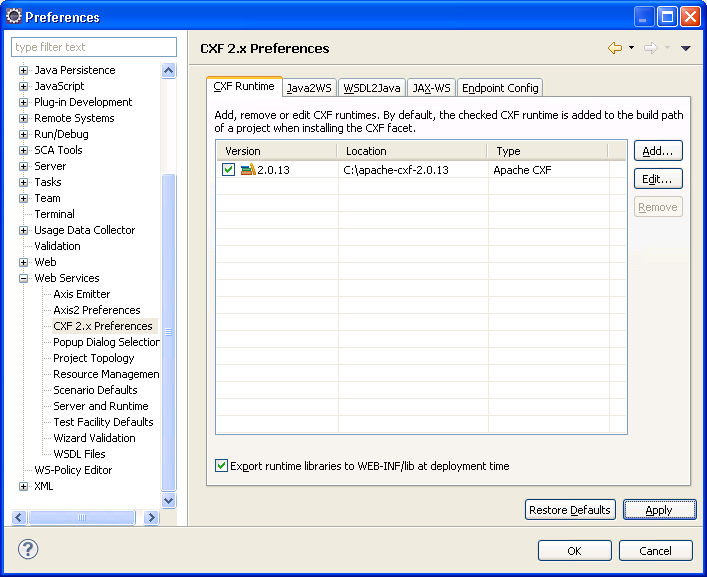
Download Apache CXF and set it’s path in your preferences  http://archive.apache.org/dist/cxf/2.0.13/ :

Be sure the “Export runtime libraries to WEB-INF/lib at deployment time” is checked.  This will make sure the Apache CXF jars are copied into the web project when you deploy the application.  

Download Tomcat 6.X or greater and set it in your preferences:


Now that we should have all the tools we need, let’s start the fun part of developing our service.

In this example, I’m assuming that I’m starting with a WSDL and going to generate the code for my service from that.  The steps we will follow are:

  1. Create a Dynamic Web Project for our generated code.
  2. Copy the WSDL into our web project.
  3. Generate the JAX-WS code from the WSDL.
  4. Deploy our application to Tomcat.
  5. Test with SOAP UI.

I’ve got a simple WSDL that is a spell checking web service.  It allows you to pass in some text and then in the response it will identify any misspelled words and also give you suggestions for correct spellings.  We won’t code this functionality, but that’s the WSDL and operation we are working with.

So, let’s do it!  

1) Create a Dynamic Web Project and use the CXF Web Services Project v2.5 Configuration.

Edit the source folder locations to match Maven standards (src/main/java)

Update Content directory to match maven standards(webapp instead of WebContent)


Choose the CXF 2.0.13 runtime.


2) Copy wsdl under the WEB-INF folder into a wsdl folder(you’ll have to create the WSDL folder):

3) Right click on the WSDL and choose Web Services->Generate Java Bean Skeleton:

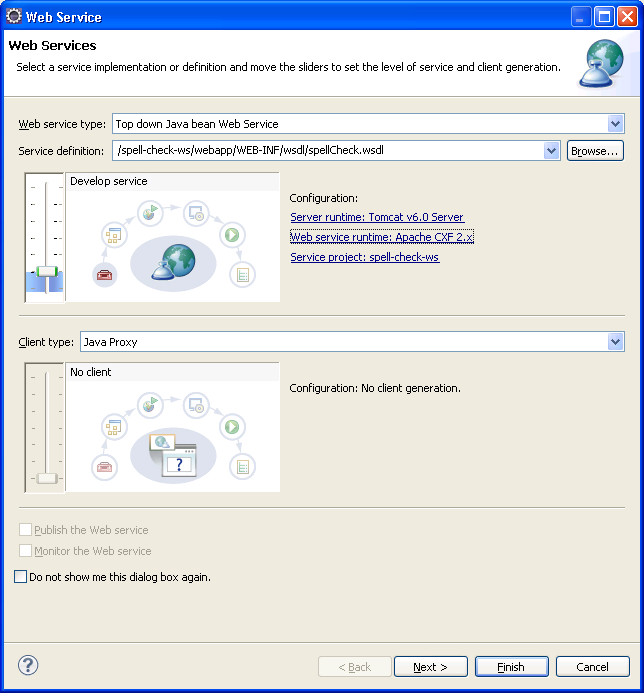
Adjust the Web Services Runtime to be Apache CXF 2.X:

You can adjust the package name if you want: This should be the package name of where the service class will reside, not the request/response objects.

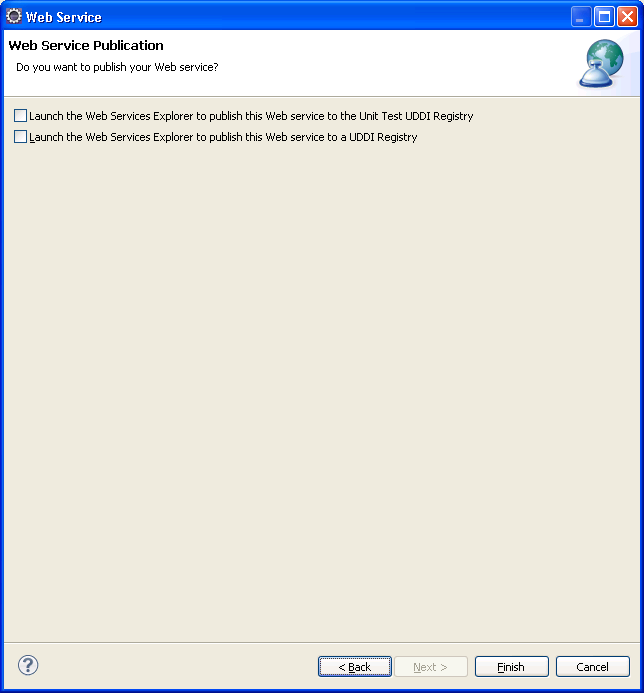
Next window is for the WSDL2Java and XJC binding(request/response) JAX-B bindings. (leave the defaults)


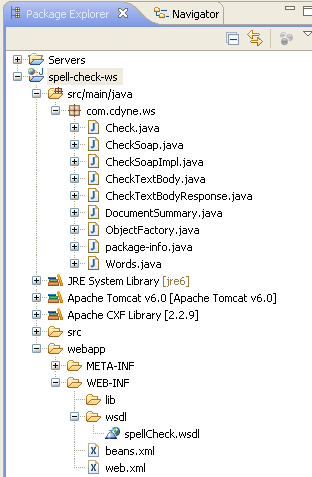
What’s Generated :


This updates the web.xml to define a CXFServlet that will receive the incoming web service request.  Also, the web.xml is updated to configure spring with the beans.xml. (NOTE: that in Websphere there is no need for any special servlet definitions. In WAS, the container scans for the JAX-WS annotations and automatically exposes your services based on the annotations alone.)

<?xml version="1.0" encoding="UTF-8"?>
<web-app xmlns:xsi="http://www.w3.org/2001/XMLSchema-instance" xmlns="http://java.sun.com/xml/ns/javaee" xmlns:web="http://java.sun.com/xml/ns/javaee/web-app_2_5.xsd" xsi:schemaLocation="http://java.sun.com/xml/ns/javaee http://java.sun.com/xml/ns/javaee/web-app_2_5.xsd" id="WebApp_ID" version="2.5">
 <display-name>spell-check-ws</display-name>
 <welcome-file-list>
   <welcome-file>index.html</welcome-file>
   <welcome-file>index.htm</welcome-file>
   <welcome-file>index.jsp</welcome-file>
   <welcome-file>default.html</welcome-file>
   <welcome-file>default.htm</welcome-file>
   <welcome-file>default.jsp</welcome-file>
 </welcome-file-list>
 <servlet>
   <description>Apache CXF Endpoint</description>
   <display-name>cxf</display-name>
   <servlet-name>cxf</servlet-name>
   <servlet-class>org.apache.cxf.transport.servlet.CXFServlet</servlet-class>
   <load-on-startup>1</load-on-startup>
 </servlet>
 <servlet-mapping>
   <servlet-name>cxf</servlet-name>
   <url-pattern>/services/*</url-pattern>
 </servlet-mapping>
 <session-config>
   <session-timeout>60</session-timeout>
 </session-config>
 <context-param>
   <param-name>contextConfigLocation</param-name>
   <param-value>WEB-INF/beans.xml</param-value>
 </context-param>
 <listener>
   <listener-class>org.springframework.web.context.ContextLoaderListener</listener-class>
 </listener>
</web-app>

The beans.xml is autogenerated and is what links the web service to the implemenation class.

<?xml version="1.0" encoding="UTF-8"?>
<beans xmlns="http://www.springframework.org/schema/beans"
xmlns:xsi="http://www.w3.org/2001/XMLSchema-instance" xmlns:jaxws="http://cxf.apache.org/jaxws"
xsi:schemaLocation="http://www.springframework.org/schema/beans http://www.springframework.org/schema/beans/spring-beans-2.5.xsd http://cxf.apache.org/jaxws http://cxf.apache.org/schemas/jaxws.xsd">
<import resource="classpath:META-INF/cxf/cxf.xml" />
<import resource="classpath:META-INF/cxf/cxf-extension-soap.xml" />
<import resource="classpath:META-INF/cxf/cxf-servlet.xml" />
<jaxws:endpoint xmlns:tns="http://ws.cdyne.com/" id="checksoap"
implementor="com.cdyne.ws.CheckSoapImpl" wsdlLocation="WEB-INF/wsdl/spellCheck.wsdl"
endpointName="tns:checkSoap" serviceName="tns:check" address="/checkSoap">
<jaxws:features>
<bean class="org.apache.cxf.feature.LoggingFeature" />
</jaxws:features>
</jaxws:endpoint>
</beans>


It even generates an implementation of the service:

@javax.jws.WebService(
                     serviceName = "check",
                     portName = "checkSoap",
                     targetNamespace = "http://ws.cdyne.com/",
                     wsdlLocation = "http://ws.cdyne.com/SpellChecker/check.asmx?wsdl",
                     endpointInterface = "com.cdyne.ws.CheckSoap")
                     
public class CheckSoapImpl implements CheckSoap {

   private static final Logger LOG = Logger.getLogger(CheckSoapImpl.class.getName());

   /* (non-Javadoc)
    * @see com.cdyne.ws.CheckSoap#checkTextBody(java.lang.String  bodyText ,)java.lang.String  licenseKey )*
    */
   public com.cdyne.ws.DocumentSummary checkTextBody(java.lang.String bodyText,java.lang.String licenseKey) {
       LOG.info("Executing operation checkTextBody");
       System.out.println(bodyText);
       System.out.println(licenseKey);
       try {
           com.cdyne.ws.DocumentSummary _return = new com.cdyne.ws.DocumentSummary();
           java.util.List<com.cdyne.ws.Words> _returnMisspelledWord = new java.util.ArrayList<com.cdyne.ws.Words>();
           com.cdyne.ws.Words _returnMisspelledWordVal1 = new com.cdyne.ws.Words();
           java.util.List<java.lang.String> _returnMisspelledWordVal1Suggestions = new java.util.ArrayList<java.lang.String>();
           _returnMisspelledWordVal1.getSuggestions().addAll(_returnMisspelledWordVal1Suggestions);
           _returnMisspelledWordVal1.setWord("Word-206675031");
           _returnMisspelledWordVal1.setSuggestionCount(969026437);
           _returnMisspelledWord.add(_returnMisspelledWordVal1);
           _return.getMisspelledWord().addAll(_returnMisspelledWord);
           _return.setVer("Ver-644250047");
           _return.setBody("Body-2010852480");
           _return.setMisspelledWordCount(-774292127);
           return _return;
       } catch (Exception ex) {
           ex.printStackTrace();
           throw new RuntimeException(ex);
       }
   }

}

4) Deploying:

Add the project to your Tomcat server:


Then after publishing and restarting the server:


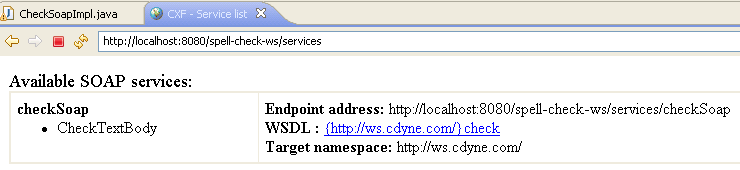
This shows the available services.  If you click on the link after “WSDL:” it will show you the WSDL (NOTE: the text is not the actual link) Clicking on the text takes you to:


Notice the service portion of the WSDL is updated with the endpoint address for your server:
- <wsdl:service name="check">
  <wsdl:documentation xmlns:wsdl="http://schemas.xmlsoap.org/wsdl/">This engine makes spelling suggestions for text.<br><br><b>See it working at</b>: <a href="http://www.cdyne.com/SpellChecker" target="_blank">http://www.cdyne.com/SpellChecker</a></wsdl:documentation>
- <wsdl:port binding="tns:checkSoap" name="checkSoap">
  <soap:address location="http://localhost:8080/spell-check-ws/services/checkSoap" />
  </wsdl:port>
  </wsdl:service>


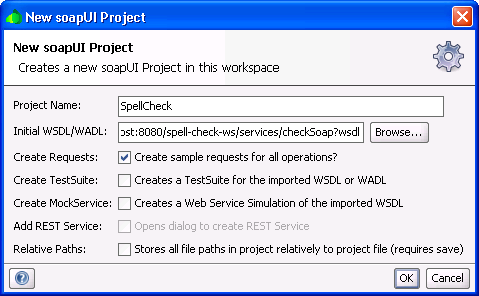
5) Testing with SOAP UI.

You can use the WSDL location above to create your SOAP UI project.


Soap UI will generate a sample request, then you just have to fill in the values.
My sample request:

<soapenv:Envelope xmlns:soapenv="http://schemas.xmlsoap.org/soap/envelope/" xmlns:ws="http://ws.cdyne.com/">
  <soapenv:Header/>
  <soapenv:Body>
     <ws:CheckTextBody>
        <!--Optional:-->
        <ws:BodyText>My poorly speeleed body.</ws:BodyText>
        <!--Optional:-->
        <ws:LicenseKey>key123</ws:LicenseKey>
     </ws:CheckTextBody>
  </soapenv:Body>
</soapenv:Envelope>


And my response:

<soap:Envelope xmlns:soap="http://schemas.xmlsoap.org/soap/envelope/">
  <soap:Body>
     <CheckTextBodyResponse xmlns="http://ws.cdyne.com/">
        <DocumentSummary>
           <MisspelledWord>
              <word>Word-857902635</word>
              <SuggestionCount>-850205234</SuggestionCount>
           </MisspelledWord>
           <ver>Ver-1888918001</ver>
           <body>Body1625834665</body>
           <MisspelledWordCount>-686503157</MisspelledWordCount>
        </DocumentSummary>
     </CheckTextBodyResponse>
  </soap:Body>
</soap:Envelope>


The service worked and I didn’t touch a line of code!!!

The logs show the incoming and outgoing messages:


Hope this helps someone!